Configure Export Power BI report to file⚓︎
PowerBI Portal uses the Power BI export to file feature to export reports as PDF, PowerPoint and PNG files. These exports are used when users export a report and in scheduled emails. PNG exports of more than one page, and PNG scheduled emails, are sent as a .zip file.
Before using the export to file option, verify that the following tenant admin settings are enabled in the Power BI admin portal:
-
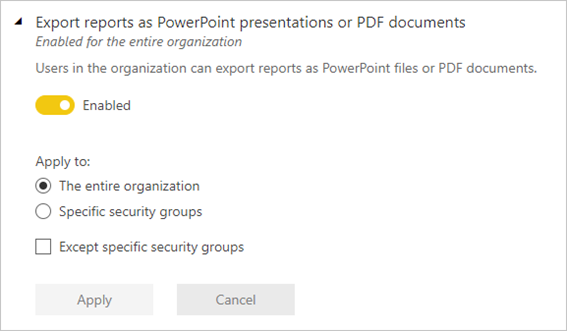
Export reports as PowerPoint presentations or PDF documents - Enabled by default.
-
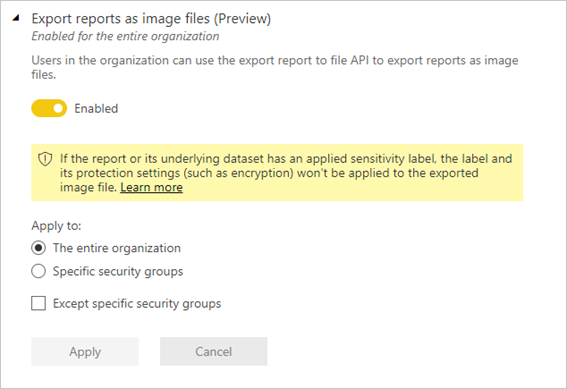
Export reports as image files - Required only for .png and disabled by default.
Export reports as PowerPoint presentations or PDF documents.
Users can export reports as PowerPoint files or PDF documents.
Export reports as image files
Users can use the export report to file API to export reports as image files.
Limitations
This feature has limitations because it is a Power BI-specific feature and operation. These are:
- The report you're exporting must reside in a workspace backed by a Premium, Embedded, or Fabric capacity. Premium Per User (PPU) is not supported.
- All the semantic models of the report you're exporting must reside on a Premium, Embedded, or Fabric capacity, including semantic models with a DirectQuery connection.
- The export to file feature supports a maximum of 500 concurrent requests per capacity.
- Exported reports cannot exceed a file size of 250 MB.
- When exporting to .png, sensitivity labels are not supported.
- The number of exports (single visuals or report pages) that can be included in an exported report is 50 (this doesn't include exporting paginated reports). If the request includes more exports, the API returns an error and the export job is canceled
- Personal bookmarks and persistent filters are not supported.
- The Power BI visuals listed below are not supported. When a report containing these visuals is exported, the parts of the report that contain these visuals will not render and will display an error symbol.
- Uncertified Power BI visuals
- R visuals
- PowerApps
- Python visuals
- Power Automate
- Paginated report visual
- Visio
- ArcGIS visuals
learn.microsoft.com/en-us/power-bi/developer/embedded/export-to#considerations-and-limitations